สร้างวิดีโอมุมกล้องโดรน
จากภาพถ่ายนิ่งใบเดียว
ไม่ต้องมีโดรน ไม่ต้องขออนุญาตบิน ไม่ต้องรอฟ้าเปิด — ใช้ภาพถ่ายที่มีอยู่แล้ว 1 ใบ ให้ AI สร้างการเคลื่อนกล้องแบบภาพยนตร์ขึ้นมา
AI ไม่ได้ “ขยับภาพ” แบบใส่เอฟเฟกต์ซูม แต่มันเดาว่าฉากนั้นมีความลึกอย่างไร แล้วสร้างเฟรมใหม่ขึ้นมาทีละเฟรมราวกับมีกล้องบินอยู่จริง — สิ่งที่อยู่ใกล้จึงเคลื่อนเร็วกว่าสิ่งที่อยู่ไกล (เรียกว่า parallax) และด้านที่ไม่เคยเห็นในภาพต้นฉบับก็ถูกสร้างขึ้นใหม่
| ถ่ายด้วยโดรนจริง | สร้างด้วย Google Flow | |
|---|---|---|
| ต้นทุน | ค่าโดรน + คนบิน | ค่าบริการ AI |
| ขออนุญาต | ต้องขึ้นทะเบียนและขออนุญาตบิน | ไม่ต้อง |
| สภาพอากาศ | ฝนตก ลมแรง บินไม่ได้ | ไม่เกี่ยว |
| ความสมจริง | จริง 100% | สมจริงมาก แต่ด้านที่มองไม่เห็นเป็นการเดา |
| เหมาะกับ | งานที่ต้องการภาพจริงตามข้อเท็จจริง | คลิปโปรโมต เปิดตัว พรีเซนต์ |
| สิ่งที่ต้องมี | หมายเหตุ |
|---|---|
| ภาพถ่าย 1 ใบ | ยิ่งคมชัดและมุมกว้าง ยิ่งได้ผลดี · ถ่ายด้วยมือถือก็ได้ |
| บัญชี Google Flow | เข้าที่ labs.google/fx/tools/flow · เช็กว่าเปิดให้ใช้ในประเทศไทยแล้วหรือยัง |
| Prompt ภาษาอังกฤษ | คัดลอกจากหน้านี้ไปแก้ได้เลย |
| ความอดทน | ต้องลองหลายรอบ — ผลลัพธ์แต่ละครั้งไม่เหมือนกัน |
ทั้งสามคลิปสร้างจากภาพถ่ายนิ่งใบเดียว ไม่มีการถ่ายวิดีโอจริงเลย — กดเล่นเพื่อดูการเคลื่อนกล้อง แล้วอ่าน Prompt ใต้คลิปเทียบกัน
🖼️ ภาพต้นฉบับที่ใช้ทั้งหมดมี 2 ใบ — ทุกคลิปในหน้านี้เกิดจากภาพนิ่งพวกนี้ล้วน ๆ ไม่มีการถ่ายวิดีโอเลย
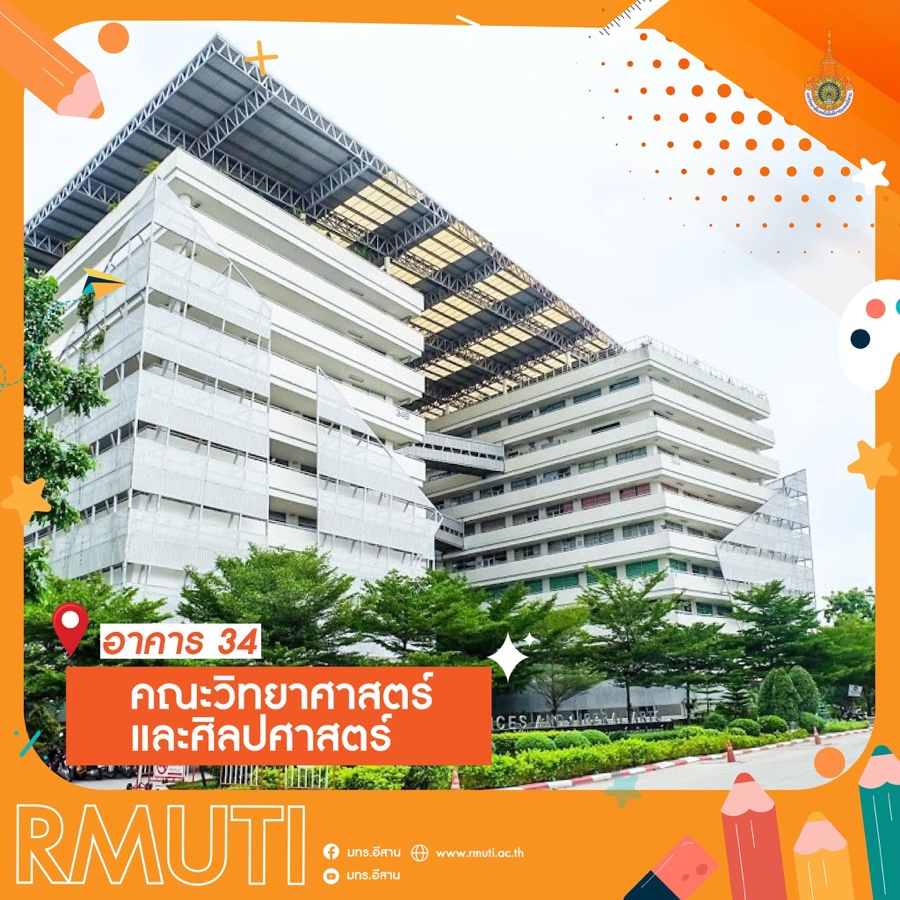
ใช้กับคลิป 1 และ 2
อาคาร 34 มทร.อีสาน · เป็นโปสเตอร์ที่มีกรอบกราฟิกอยู่แล้ว
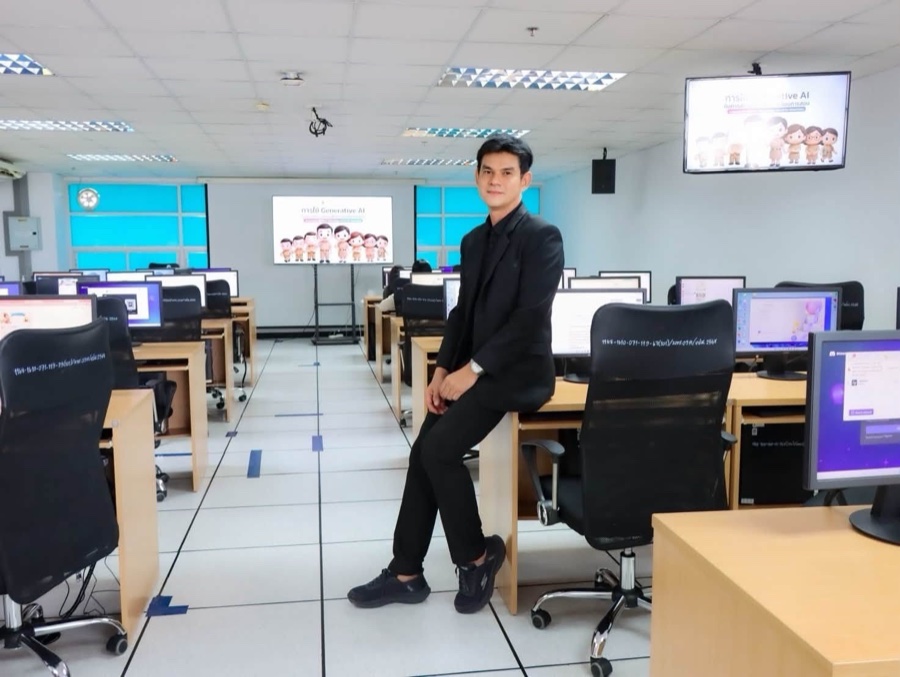
ใช้กับคลิป 3
ห้องปฏิบัติการคอมพิวเตอร์ · มีคนอยู่ในเฟรม
👀 ลองสังเกตตอนดูคลิป: ภาพซ้ายเป็นภาพมุมเฉียงเห็นสองด้านของอาคาร ซึ่งเป็นมุมที่ AI เดาความลึกได้ดีที่สุด — ถ้าถ่ายมุมตรงหน้าตรง ๆ ผลลัพธ์จะแบนกว่านี้มาก
โคจรรอบอาคาร (Orbit)
เผยด้านที่ไม่เคยเห็น
ภาพต้นฉบับ
โปสเตอร์อาคาร 34
ผลลัพธ์
กดเล่นเพื่อดูการเคลื่อนกล้อง
กล้องบินโค้งรอบอาคารเป็นวงประมาณ 120–160 องศา โดยให้อาคารอยู่กลางเฟรมตลอด · จุดยากคือด้านที่ภาพต้นฉบับมองไม่เห็น ซึ่ง Prompt ต้องสั่งให้ AI สร้างต่อโดยใช้ภาษาสถาปัตยกรรมเดิม ไม่ใช่คิดหน้าตาใหม่
คลิปนี้ผ่านการใส่กราฟิกชื่อสถานที่เพิ่มทีหลังในโปรแกรมตัดต่อ ไม่ได้มาจาก AI
Cinematic drone orbit shot — architectural reveal.

Environment: same modern multi-story academic building as the reference image (white/light-grey vertical louvered facade, angular two-wing structure, distinctive raised steel-truss canopy roof sweeping diagonally across the top). Green trees and shrubs at the base, paved road curving past the entrance, soft bright daylight sky.

Camera path: begin at the current front-angled viewpoint, ground-adjacent height. Smoothly arc the drone sideways and slightly upward around the building in a continuous orbital sweep (roughly a 120-160 degree arc), keeping the building centered as the subject throughout. As the camera revolves, gradually reveal the adjoining facade and side of the structure that extends beyond the original frame, maintaining consistent architectural style, material, and proportions with the visible portion. Finish the arc at a three-quarter angle that shows a fresh, previously-unseen side of the building, roof truss structure still visible against the sky.

Movement quality: smooth, professional orbital drone cinematography with natural ease-in/ease-out acceleration — gentle build into the turn, steady mid-orbit speed, soft settle at the end. Subtle gimbal-style stabilization throughout, no jitter or shake, constant radius from the building so it never appears to warp or lean unnaturally.

Depth and parallax: strong multi-layer parallax typical of an orbit move — foreground trees and near building edges sweep past faster and with more apparent motion than the building mass itself, while the sky and distant background shift only slightly, reinforcing the sense of circling a solid three-dimensional structure.

Fidelity: preserve every visible detail of the original building exactly — facade panels, window grid, truss structure, tree placement, road layout, proportions, and lighting must remain faithful and unwarped for the portion shown in the source image. Extrapolate the newly revealed side conservatively, matching the same architectural language (material, color, window rhythm, roofline) rather than inventing unrelated features. No morphing, melting, or distortion of the structure; only the camera moves, the building stays coherent and solid throughout the turn.

Lighting and atmosphere: realistic, dynamic light and shadow shifts across the facade and truss structure as the camera angle changes relative to the sun, consistent with the soft daylight in the source image — shadows should rotate naturally with the viewing angle. Subtle environmental motion for realism (leaves shifting in the foliage, faint drifting clouds) without altering the building itself.

Style: high-end professional architectural orbit shot, the kind used in campus promotional films or real-estate showcases — fluid, continuous, cinematic motion, no cuts, no jitter, no warping, deliberate pacing that builds a sense of discovery as new angles of the building come into view.

Duration/pacing: one continuous unbroken orbital take, smooth and consistent in speed and radius from first frame to last.
บินไต่ขึ้นเปิดฉาก (Flyover)
ภาพเปิดเรื่อง
ภาพต้นฉบับ
ภาพอาคารเดียวกัน
ผลลัพธ์
กดเล่นเพื่อดูการเคลื่อนกล้อง
เริ่มจากระดับพื้นแถวต้นไม้ แล้วไต่ขึ้นตามแนวทแยงของโครงหลังคา จากซ้ายล่างไปขวาบน จบด้วยภาพกว้างเห็นอาคารทั้งสองปีก — เป็นมุมมาตรฐานของภาพเปิดสารคดี ใช้ขึ้นต้นคลิปแนะนำหน่วยงานได้ดีมาก
Cinematic drone flyover — architectural establishing shot.

Environment: a modern multi-story academic building (white and light-grey vertical louvered facade, angular two-wing structure meeting at a dynamic diagonal), topped with a distinctive raised steel-truss canopy/pergola roof structure that sweeps diagonally across the top of the building. Lush green trees and manicured shrubs line the base of the building, with a paved road curving past the entrance in the foreground. Soft, bright, slightly hazy daylight sky.

Camera path: begin low, near ground level by the tree line at the base of the building. Rise and advance smoothly along the diagonal line formed by the rooftop truss structure, moving from lower-left toward upper-right, tracking the building's angular form as it unfolds. Continue climbing until the shot opens into a wide view revealing both wings of the building and the full sweep of the roof structure against the sky, ending the take looking out past the rooftop into open sky.

Movement quality: smooth, professional drone cinematography with natural ease-in/ease-out acceleration and deceleration — gradual speed build at the start, gentle settle at the end, no sudden jumps. Subtle gimbal-style stabilization throughout; only the faintest natural micro-sway, never jarring or shaky.

Depth and parallax: realistic multi-layer parallax as the camera advances — foreground trees and near facade edges pass with more apparent motion than the mid-ground building mass and the distant sky/background, creating convincing three-dimensional depth as if flying through real space rather than over a flat image.

Fidelity: preserve every detail of the original building exactly — facade panels, window grid, truss structure, tree placement, road layout, and proportions must remain faithful and unwarped. No morphing, melting, or distortion of the static structure; only the camera moves, the building and environment stay coherent and stable.

Lighting and atmosphere: realistic, dynamic light and shadow shifts across the facade and truss structure as the camera angle changes, consistent with the soft daylight already present in the source image. Subtle environmental motion for realism — light movement in the tree foliage, faint drifting clouds — without altering the building itself.

Style: high-end professional aerial/architectural establishing shot, the kind used to open a documentary or campus promotional film — fluid, continuous, cinematic camera motion, no cuts, no jitter, no warping, framing and pacing that feel intentional and build anticipation.

Duration/pacing: one continuous unbroken take, following the described path start to finish with consistent, believable drone flight physics.
เลื่อนเข้าไปในห้อง (Interior glide)
มีคนอยู่ในภาพ
ภาพต้นฉบับ
ห้องคอมพิวเตอร์
ผลลัพธ์
กดเล่นเพื่อดูการเคลื่อนกล้อง
กล้องเลื่อนไปข้างหน้าตามทางเดินกลางห้อง ผ่านคนที่นั่งอยู่ แล้วยกขึ้นเปิดเป็นภาพกว้างเห็นทั้งห้อง · ยากที่สุดในสามคลิป เพราะมีคนอยู่ในเฟรม — AI มักทำให้ใบหน้าเพี้ยนหรือมีคนโผล่มาเพิ่มกลางคลิป
Animate this exact image as the starting frame — preserve the room exactly as photographed: ceiling pattern and lighting, cyan-tinted windows, both AI-slide displays, desk layout, chair style, floor tiles, blue tape markings, and everyone's exact clothing and pose.

Camera motion only: one single, continuous, unbroken forward glide at a smooth, constant-to-gently-rising speed — no stops, no separate phases. The camera drifts forward down the central aisle, passing directly beside the man in the black suit without pausing on him — he may naturally turn his head to follow the camera briefly as it passes, but his pose and position stay exactly the same. As the camera continues past him toward the front of the room, it gently rises and arcs slightly wider, opening into a broad establishing view that reveals the full classroom in one continuous sweep — both rows of desks, the front projection screen, the wall-mounted display, and the cyan-tinted windows all visible together by the end of the shot.

Keep every person, chair, and object in the frame completely static and stable throughout — nothing appears, disappears, or pops in mid-shot. Very subtle gimbal micro-sway only, consistent lighting and exposure throughout, no flicker, no warping, no morphing of any object or person.
ผลลัพธ์สุดท้ายหลังตัดต่อ
22 วินาทีนี่คือวิธีทำงานจริง — ไม่ได้สั่ง AI ให้สร้างคลิปยาว 22 วินาทีรวดเดียว แต่สร้างทีละเทกสั้น ๆ แล้วเอามาต่อกันในโปรแกรมตัดต่อ พร้อมใส่ทรานซิชันจางซ้อนระหว่างช็อต
- คุมได้ทีละช็อต — เทกไหนเพี้ยนก็สร้างใหม่เฉพาะเทกนั้น ไม่ต้องรื้อทั้งคลิป
- ยิ่งยาวยิ่งเพี้ยน — คลิปที่สั่งยาว ๆ มักหลุดรูปทรงหรือเปลี่ยนหน้าตาอาคารกลางทาง
- ประหยัดโควตา — สร้างใหม่แค่ 8 วินาที ถูกกว่าสร้างใหม่ทั้ง 22 วินาที
- ใส่กราฟิกและเสียงได้อิสระ — ชื่อสถานที่ โลโก้ ดนตรีประกอบ ใส่ทีหลังในโปรแกรมตัดต่อ คมชัดกว่าให้ AI สร้าง
สร้างวิดีโอมุมกล้องโดรนบินผ่าน (drone flyover) แนวภาพยนตร์ โดยใช้ภาพที่อัปโหลดเป็นฉากแวดล้อม ให้มุมกล้องเคลื่อนที่ตามเส้นทางที่วาดไว้บนภาพอย่างแม่นยำ สร้างการเคลื่อนไหวของโดรนที่นุ่มนวล มีการเร่งความเร็วที่เป็นธรรมชาติ มีระบบกันสั่นและเอฟเฟกต์มิติภาพ (parallax) ที่สมจริง คงรายละเอียดทั้งหมดจากภาพต้นฉบับไว้ พร้อมเพิ่มความลึกและมุมมองตามการเคลื่อนที่ของกล้อง ให้ความรู้สึกเหมือนเป็นภาพมุมสูงเปิดฉาก (aerial establishing shot) ระดับมืออาชีพ มีแสงเงาและการเคลื่อนไหวของสภาพแวดล้อมที่สมจริง การเคลื่อนไหวลื่นไหลและตรงตามเส้นที่ร่างไว้ตั้งแต่ต้นจนจบ
ช่วยแปลงคำอธิบายวิดีโอด้านล่างเป็น prompt ภาษาอังกฤษสำหรับเครื่องมือสร้างวิดีโอ AI
โดยจัดให้ครบ 8 หัวข้อนี้ หัวข้อละย่อหน้า

1. ประโยคเปิด บอกชนิดช็อตในหนึ่งบรรทัด
2. Environment — บรรยายฉากและวัตถุในภาพให้ละเอียด
3. Camera path — จุดเริ่ม เส้นทาง จุดจบ ของกล้อง
4. Movement quality — ความนุ่มนวล การเร่ง/ชะลอ การกันสั่น
5. Depth and parallax — อะไรเคลื่อนเร็ว อะไรเคลื่อนช้า
6. Fidelity — สิ่งที่ห้ามเปลี่ยน และสิ่งที่ให้เดาอย่างระมัดระวัง
7. Lighting and atmosphere — แสงเงาและการเคลื่อนไหวของสภาพแวดล้อม
8. Style + Duration — อ้างอิงสไตล์งานจริง และย้ำว่าเป็นเทกเดียวไม่มีตัดต่อ

ใช้ศัพท์เทคนิคภาพยนตร์ที่ถูกต้อง และปิดท้ายด้วยรายการสิ่งที่ห้ามเกิด
เช่น no cuts, no jitter, no warping, no morphing

คำอธิบายของฉัน:
[วางคำอธิบายภาษาไทยของคุณตรงนี้]
1. ประโยคเปิด — บอกชนิดช็อต
บอกในบรรทัดเดียวว่านี่คือช็อตแบบไหน เพื่อให้ AI ตั้งกรอบความคิดถูกตั้งแต่แรกCinematic drone orbit shot — architectural reveal.
2. Environment — ฉากมีอะไรบ้าง
บรรยายสิ่งที่อยู่ในภาพให้ละเอียดที่สุด สี วัสดุ รูปทรง ต้นไม้ ถนน ท้องฟ้า · ยิ่งบรรยายละเอียด AI ยิ่งรักษาของเดิมไว้ได้
3. Camera path — เส้นทางกล้อง
หัวใจของทั้ง prompt · ต้องบอก จุดเริ่ม → เคลื่อนอย่างไร → จบตรงไหน · ระบุตัวเลของศาหรือทิศทางได้ยิ่งดี เช่น "120–160 องศา" หรือ "จากซ้ายล่างไปขวาบน"
4. Movement quality — คุณภาพการเคลื่อนไหว
สั่งให้เร่งและชะลออย่างเป็นธรรมชาติ (ease-in/ease-out) และมีระบบกันสั่นแบบ gimbal · ถ้าไม่สั่ง กล้องมักกระตุกหรือเคลื่อนเร็วสม่ำเสมอจนดูเป็นภาพคอมพิวเตอร์
5. Depth and parallax — ความลึก
บอกว่าของใกล้ต้องเคลื่อนเร็วกว่าของไกล · นี่คือสิ่งที่แยกระหว่าง "คลิปโดรนจริง" กับ "ภาพนิ่งที่ถูกซูม"
6. Fidelity — สิ่งที่ห้ามเปลี่ยน
ไล่ชื่อสิ่งที่ต้องคงไว้ให้ครบ แล้วปิดท้ายด้วย only the camera moves · ถ้ามีส่วนที่ต้องสร้างใหม่ ให้สั่งว่าเดาอย่างระมัดระวังโดยยึดของเดิม
7. Lighting and atmosphere — แสงและบรรยากาศ
สั่งให้เงาหมุนตามมุมกล้าง และเติมการเคลื่อนไหวเล็ก ๆ เช่นใบไม้ไหว เมฆลอย · ช่วยให้ดูเป็นวิดีโอจริงมากขึ้น แต่ต้องย้ำว่าห้ามเปลี่ยนตัวอาคาร
8. Style + Duration — สไตล์และความยาว
อ้างอิงงานจริงที่อยากได้ เช่น "แบบคลิปโปรโมตมหาวิทยาลัย" · แล้วย้ำว่าเป็น เทกเดียวต่อเนื่อง ไม่มีการตัดต่อ
| 1. Orbit | 2. Flyover | 3. Interior | |
|---|---|---|---|
| กล้องทำอะไร | อ้อมรอบ | ไต่ขึ้นไปข้างหน้า | เลื่อนเข้าไปแล้วยกขึ้น |
| ต้องสร้างของใหม่ | มาก — ด้านหลังอาคาร | น้อย | น้อย แต่มีคน |
| ความยาก | ปานกลาง | ง่ายสุด | ยากสุด |
| ปัญหาที่เจอบ่อย | ด้านใหม่กลายเป็นตึกคนละหลัง | ต้นไม้หน้าฉากยืดผิดรูป | หน้าคนเพี้ยน คนโผล่เพิ่ม |
| เหมาะกับ | โชว์อาคารรอบด้าน | ภาพเปิดคลิป | พาชมภายใน |
👉 ถ้าเพิ่งเริ่ม ให้ลองแบบ Flyover ก่อน เพราะกล้องไม่ต้องอ้อมไปด้านที่มองไม่เห็น โอกาสได้คลิปที่ใช้ได้เลยสูงที่สุด
Cinematic drone [orbit / flyover / forward glide] shot — [architectural reveal / establishing shot].

Environment: [บรรยายสิ่งที่อยู่ในภาพให้ละเอียด: ชนิดอาคาร สีและวัสดุผนัง รูปทรงหลังคา ต้นไม้ ถนน ท้องฟ้า สภาพแสง]

Camera path: begin at [จุดเริ่มและระดับความสูง]. [บรรยายการเคลื่อนที่: อ้อมไปทางไหน กี่องศา หรือไต่ขึ้นตามแนวไหน]. Finish at [จุดจบและสิ่งที่เห็นในเฟรมสุดท้าย].

Movement quality: smooth, professional drone cinematography with natural ease-in/ease-out acceleration — gentle build at the start, steady mid-shot speed, soft settle at the end. Subtle gimbal-style stabilization throughout, no jitter or shake.

Depth and parallax: realistic multi-layer parallax — [ของหน้าฉาก] pass with more apparent motion than [ตัวอาคาร], while the sky and distant background shift only slightly.

Fidelity: preserve every visible detail of the original exactly — [ไล่ชื่อสิ่งที่ห้ามเปลี่ยน]. No morphing, melting, or distortion; only the camera moves. [ถ้ามีด้านที่ต้องสร้างใหม่] Extrapolate the newly revealed side conservatively, matching the same architectural language rather than inventing unrelated features.

Lighting and atmosphere: realistic light and shadow shifts as the camera angle changes, consistent with the [สภาพแสงในภาพ] in the source image. Subtle environmental motion for realism (leaves shifting, faint drifting clouds) without altering the structure itself.

Style: high-end professional [อ้างอิงงานจริงที่อยากได้] — fluid, continuous, cinematic motion, no cuts, no jitter, no warping.

Duration/pacing: one continuous unbroken take, consistent in speed from first frame to last.
- ภาพต้นฉบับสำคัญกว่า Prompt — ภาพเบลอ ภาพมืด หรือภาพที่มีสิ่งบังหน้าฉาก ต่อให้เขียน prompt ดีแค่ไหนก็ออกมาไม่สวย
- ถ่ายมุมเฉียงดีกว่ามุมตรง — เห็นสองด้านของอาคารพร้อมกัน AI จะเดาความลึกได้แม่นกว่ามาก
- อย่าสั่งกล้องเคลื่อนไกลเกินไป — ยิ่งอ้อมมาก ยิ่งต้องสร้างของใหม่มาก ยิ่งเพี้ยนง่าย
- ต้องลองหลายรอบเป็นเรื่องปกติ — ผลลัพธ์แต่ละครั้งไม่เหมือนกัน ให้เลือกอันที่ดีที่สุด ไม่ใช่คาดหวังว่าครั้งแรกต้องได้
- ดูซ้ำแบบช้า ๆ ก่อนใช้จริง — จุดที่มักเพี้ยนคือเสาและขอบหน้าต่างตอนกล้องหมุน และใบหน้าคน
- คลิปสั้นดีกว่ายาว — 8–10 วินาทีต่อเทก แล้วเอาหลายเทกมาต่อกันในโปรแกรมตัดต่อ ได้ผลดีกว่าสั่งเทกเดียวยาว ๆ
- ใส่กราฟิกทีหลัง — ชื่อสถานที่ โลโก้ ข้อความ ควรใส่ในโปรแกรมตัดต่อ ไม่ใช่ให้ AI สร้าง เพราะตัวอักษรไทยมักเพี้ยน
- มีคนในภาพต้องขออนุญาต — ภาพใบหน้าเป็นข้อมูลส่วนบุคคลตาม PDPA · การเอาภาพคนไปสร้างวิดีโอที่เขาขยับได้ ต้องได้รับความยินยอมก่อน
- อย่าใช้ภาพอาคารของหน่วยงานอื่นโดยไม่ได้รับอนุญาต โดยเฉพาะถ้าจะใช้ในงานที่มีรายได้
- ระบุว่าเป็นภาพที่สร้างด้วย AI เมื่อใช้ในงานราชการหรือสื่อสาธารณะ เพราะบางส่วนของภาพไม่ใช่ของจริง
- เช็กเงื่อนไขการใช้งานของเครื่องมือ ก่อนนำไปใช้เชิงพาณิชย์ เงื่อนไขเปลี่ยนได้ตลอด
- Google Labs — Flow (หน้าเครื่องมือทางการ)
- Google Labs — เกี่ยวกับ Flow และข้อกำหนดการใช้งาน
- Google DeepMind — Veo (โมเดลสร้างวิดีโอที่อยู่เบื้องหลัง)
- ภาพต้นฉบับอาคาร 34 คณะวิทยาศาสตร์และศิลปศาสตร์ — มหาวิทยาลัยเทคโนโลยีราชมงคลอีสาน (มทร.อีสาน)
- คลิปตัวอย่างทั้ง 3 ในหน้านี้ สร้างจากภาพนิ่งข้างต้น โดยผู้จัดทำบทเรียน
📅 จัดทำเดือนสิงหาคม 2569 — ก่อนนำไปสอน แนะนำเปิดหน้าเครื่องมือจริงเช็กว่ายังใช้งานได้และเมนูตรงกับที่เขียนไว้